Using Webhooks Instead of Polling
By default, Fleet utilizes polling (default: every 15 seconds) to pull from a Git repo. This is a convenient default that works reasonably well for a small number of repos (up to a few tens).
For installations with multiple tens up to hundreds of Git repos, and in general to reduce latency (the time between a push to Git and fleet reacting to it), configuring webhooks is recommended instead of polling.
Fleet currently supports Azure DevOps, GitHub, GitLab, Bitbucket, Bitbucket Server, and Gogs.
1. Configure the webhook service. Fleet uses a gitjob service to handle webhook requests. Create an ingress that points to the gitjob service.
apiVersion: networking.k8s.io/v1
kind: Ingress
metadata:
  name: webhook-ingress
  namespace: cattle-fleet-system
spec:
  rules:
  - host: your.domain.com
    http:
      paths:
        - path: /
          pathType: Prefix
          backend:
            service:
              name: gitjob
              port:
                number: 80
If you want to have the webhook available using the same host name as your Rancher or another service, you can use the following YAML with the URL http://your.domain.com/gitjob. The below YAML is specific for the Nginx Ingress Controller:
apiVersion: networking.k8s.io/v1
kind: Ingress
metadata:
  annotations:
    nginx.ingress.kubernetes.io/use-regex: "true"
    nginx.ingress.kubernetes.io/rewrite-target: /$2
  name: webhook-ingress
  namespace: cattle-fleet-system
spec:
  rules:
  - host: your.domain.com
    http:
      paths:
        - path: /gitjob(/|$)(.*)
          pathType: ImplementationSpecific
          backend:
            service:
              name: gitjob
              port:
                number: 80
Ingress Nginx will be retired, here is an example using Traefik:
apiVersion: networking.k8s.io/v1
kind: Ingress
metadata:
  annotations:
    traefik.ingress.kubernetes.io/router.middlewares: cattle-fleet-system-gitjob-stripprefix@kubernetescrd
    traefik.ingress.kubernetes.io/router.priority: '100'
  name: webhook-ingress
  namespace: cattle-fleet-system
spec:
  ingressClassName: traefik
  rules:
    - host: your.domain.com
      http:
        paths:
          - backend:
              service:
                name: gitjob
                port:
                  number: 80
            path: /gitjob(/|$)(.*)
            pathType: ImplementationSpecific
Use the annotation traefik.ingress.kubernetes.io/router.priority: '100' only when two Ingress resources can conflict. This annotation assigns a higher priority to the GitJob route. This depends on the pathType property. When pathType is set to Prefix, the annotation is required.
This configuration requires a middleware to strip the additional path from the URL, since gitjob responds directly from the root path. This is equivalent to the nginx.ingress.kubernetes.io/rewrite-target annotation in Nginx:
apiVersion: traefik.io/v1alpha1
kind: Middleware
metadata:
  name: gitjob-stripprefix
  namespace: cattle-fleet-system
spec:
  stripPrefix:
    prefixes:
      - /gitjob
This approach allows a smooth migration from Ingress Nginx to Traefik while keeping the application configuration unchanged.
You can configure TLS on ingress.
2. Go to your webhook provider and configure the webhook callback url. Here is a Github example.
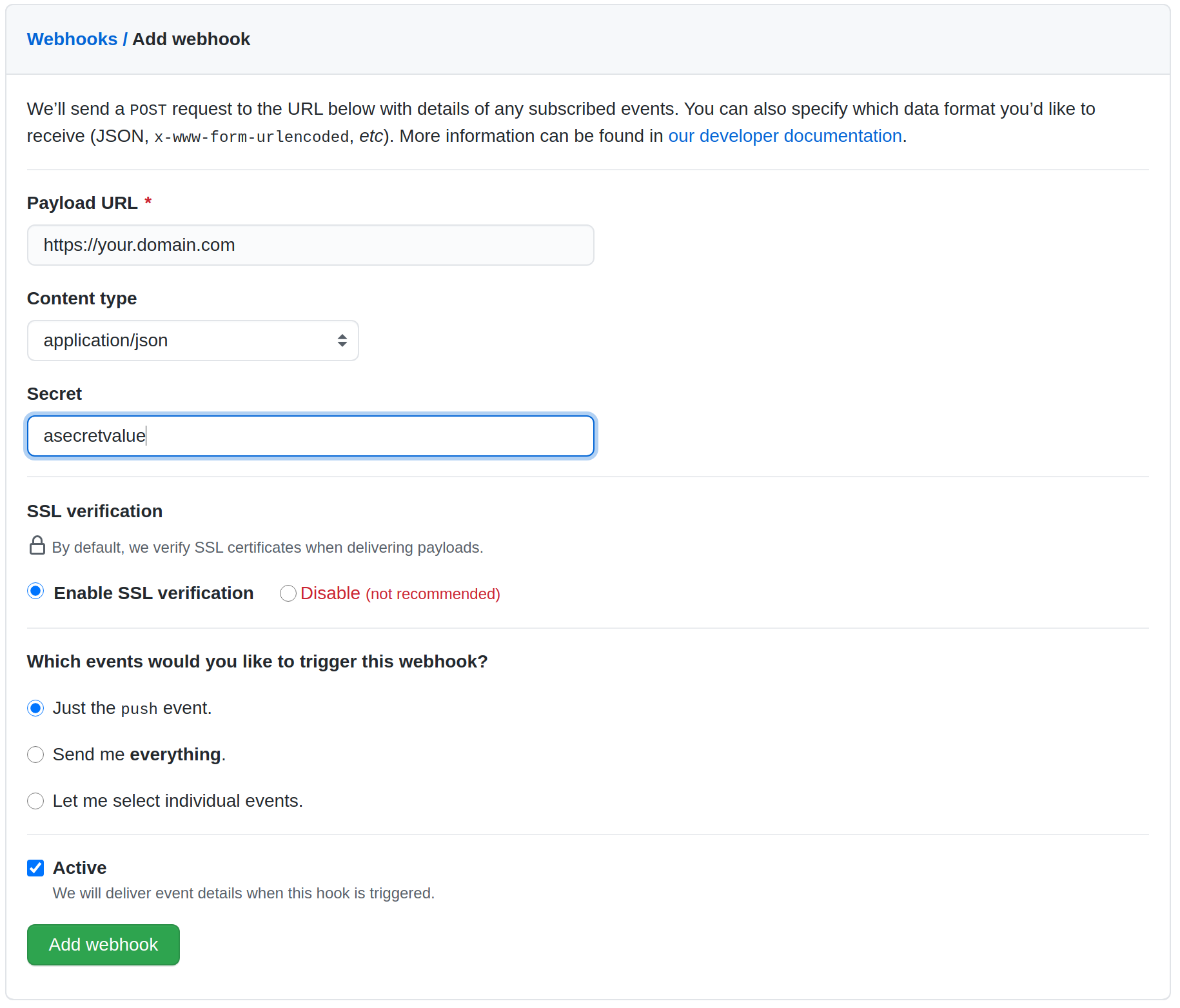
Configuring a secret is optional. This is used to validate the webhook payload as the payload should not be trusted by default. If your webhook server is publicly accessible to the Internet, then it is recommended to configure the secret. If you do configure the secret, follow step 3.
only application/json is supported due to the limitation of webhook library.
If you configured the webhook the polling interval will be automatically adjusted to 1 hour.
3. (Optional) Configure webhook secret. The secret is for validating webhook payload. Make sure to put it in a k8s secret called gitjob-webhook in cattle-fleet-system.
| Provider | K8s Secret Key |
|---|---|
| GitHub | github |
| GitLab | gitlab |
| BitBucket | bitbucket |
| BitBucketServer | bitbucket-server |
| Gogs | gogs |
| Azure DevOps | azure-username |
| Azure DevOps | azure-password |
For example, to create a secret containing a GitHub secret to validate the webhook payload, run:
kubectl create secret generic gitjob-webhook -n cattle-fleet-system --from-literal=github=webhooksecretvalue
For Azure DevOps:
- Enable basic authentication in Azure
- Create a secret containing the credentials for the basic authentication
kubectl create secret generic gitjob-webhook -n cattle-fleet-system --from-literal=azure-username=user --from-literal=azure-password=pass123