|
This is unreleased documentation for Fleet Next. |
Namespaces
Workload Namespaces
Namespace Creation Behavior in Bundles
When deploying a Fleet bundle, the specified namespace will automatically be created if it does not already exist.
Configuring Workload Namespaces
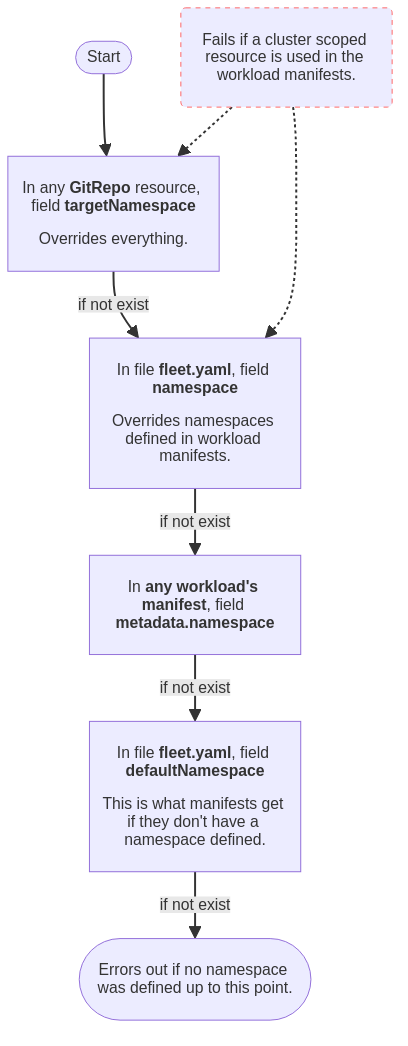
When configuring workload namespaces, it is important to be aware that certain options are designed to override the values of other options or namespace definitions in workload resources. In some cases, setting namespaces using some options may result in errors if the resources to be deployed contain non-namespaced resources. To get a better understanding of how these options interact, refer to the diagram below. For more details on a specific option, please refer to the GitRepo or fleet.yaml reference.
Cross Namespace Deployments
It is possible to create a GitRepo that will deploy across namespaces. The
primary purpose of this is so that a central privileged team can manage common
configuration for many clusters that are managed by different teams. The way
this is accomplished is by creating a BundleNamespaceMapping resource in a
cluster.
If you are creating a BundleNamespaceMapping resource it is best to do it in a
namespace that only contains GitRepos and no Clusters. It seems to get
confusing if you have Clusters in the same repo as the cross namespace
GitRepos will still always be evaluated against the current namespace. So if
you have clusters in the same namespace you may wish to make them canary
clusters.
A BundleNamespaceMapping has only two fields. Which are as below
kind: BundleNamespaceMapping
apiVersion: fleet.cattle.io/v1alpha1
metadata:
  name: not-important
  namespace: typically-unique

# Bundles to match by label.  The labels are defined in the fleet.yaml
# labels field or from the GitRepo metadata.labels field
bundleSelector:
  matchLabels:
    foo: bar

# Namespaces to match by label
namespaceSelector:
  matchLabels:
    foo: bar
If the BundleNamespaceMappings bundleSelector field matches a Bundles
labels then that Bundle target criteria will be evaluated against all clusters
in all namespaces that match namespaceSelector. One can specify labels for the
created bundles from git by putting labels in the fleet.yaml file or on the
metadata.labels field on the GitRepo.
Restricting GitRepos
|
The |
A namespace can contain multiple GitRepoRestriction resources. All GitRepos
created in that namespace will be checked against the list of restrictions. If a
GitRepo violates one of the constraints its BundleDeployment will be in an
error state and won’t be deployed.
This can also be used to set the defaults for GitRepo’s serviceAccount and
clientSecretName fields.
kind: GitRepoRestriction
apiVersion: fleet.cattle.io/v1alpha1
metadata:
  name: restriction
  namespace: typically-unique
allowedClientSecretNames: []
allowedRepoPatterns: []
allowedServiceAccounts: []
allowedTargetNamespaces: []
defaultClientSecretName: ""
defaultServiceAccount: ""
Allowed Target Namespaces
This can be used to limit a deployment to a set of namespaces on a downstream
cluster. If an allowedTargetNamespaces restriction is present, all GitRepos
must specify a targetNamespace and the specified namespace must be in the
allow list. This also prevents the creation of cluster-wide resources.
Allowed target namespace selector
allowedTargetNamespaceSelector restricts deployments, on downstream clusters, to namespaces
with labels matching the given selector. When this field is
set in a GitRepoRestriction, all GitRepos must specify a targetNamespace.
The Fleet agent checks the labels of that namespace on the downstream cluster
before deploying a bundle:
-
If the namespace exists and its labels match the selector, deployment proceeds.
-
If the namespace exists but its labels do not match, the
BundleDeploymentis set to an error state and the bundle is not deployed. -
If the namespace does not exist on the downstream cluster, the deployment fails with an error. Pre-creating the namespace and labelling it correctly is required; Helm’s
createNamespaceoption does not apply when this selector is set.
Multiple GitRepoRestriction resources in the same namespace each contribute
their allowedTargetNamespaceSelector. The selectors are merged before being
propagated to bundle deployments; a namespace must satisfy all of them.
kind: GitRepoRestriction
apiVersion: fleet.cattle.io/v1alpha1
metadata:
  name: restriction
  namespace: workspace1
allowedTargetNamespaceSelector:
  matchLabels:
    team: frontend
Restricting What Tenants May Do in a Namespace
A namespace can contain one or more Policy resources that restrict which service accounts, credential secrets, and source repositories the GitRepo, HelmOp, and Bundle resources in that namespace may use. Downstream namespace restrictions are not expressed at this layer — they are encoded as RBAC on the tenant’s downstream ServiceAccount. See Multi-Tenancy for the trust model and Tenant Setup for the operator recipe.
Fleet Namespaces
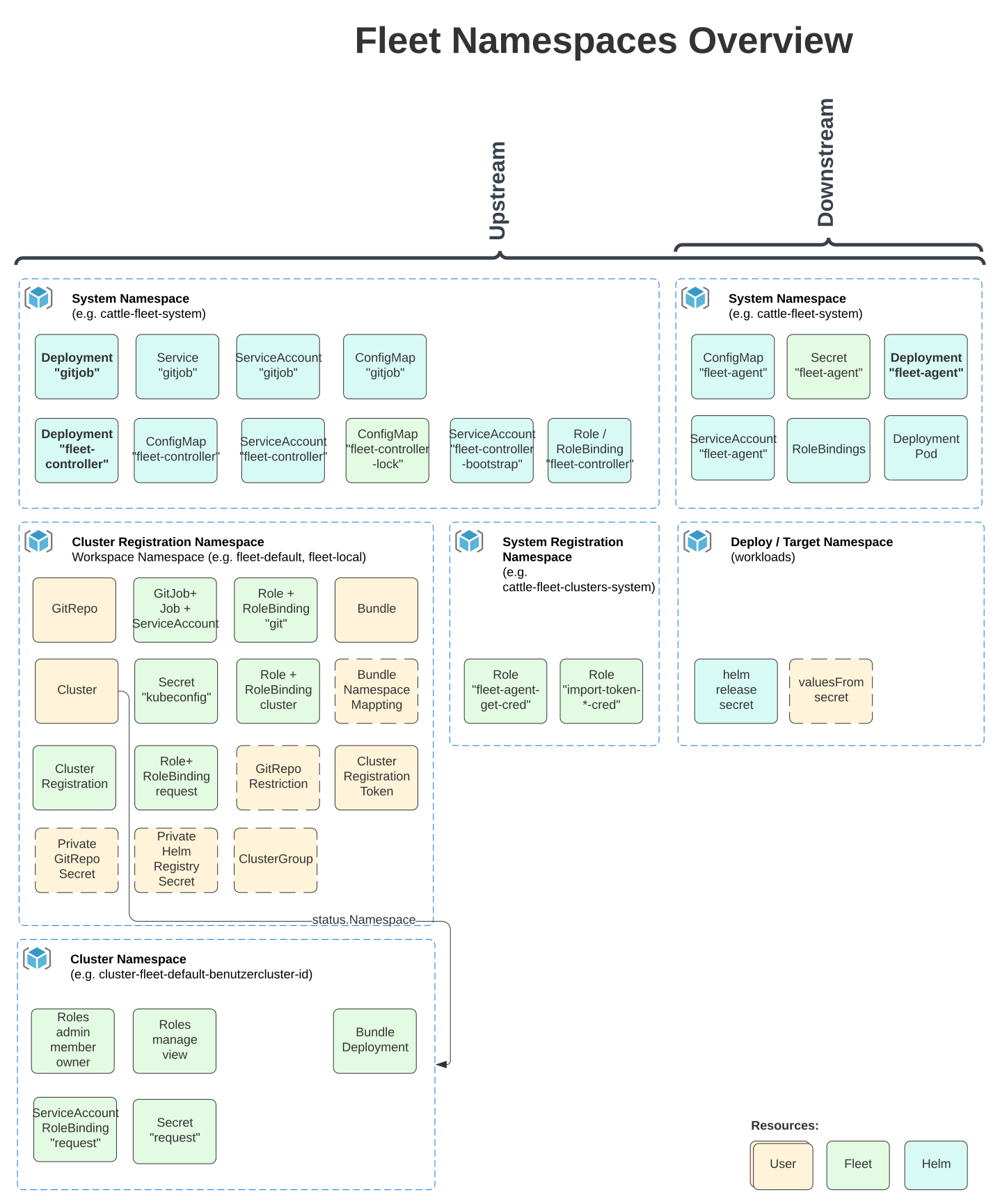
All types in the Fleet manager are namespaced. The namespaces of a custom resource, e.g. GitRepo, does not influence the namespace of deployed resources.
Understanding how namespaces are used in the Fleet manager is important to understand the security model and how one can use Fleet in a multi-tenant fashion.
GitRepos, Bundles, Clusters, ClusterGroups
All selectors for GitRepo targets will be evaluated against the Clusters
and ClusterGroups in the same namespaces. This means that if you give
create or update privileges to a GitRepo type in a namespace, that end
user can modify the selector to match any cluster in that namespace. This means
in practice if you want to have two teams self manage their own GitRepo
registrations but they should not be able to target each others clusters, they
should be in different namespaces.
The cluster registration namespace, called 'workspace' in Rancher, contains the Cluster and the
ClusterRegistration resources, as well as any GitRepos and Bundles.
Rancher will create two Fleet workspaces: fleet-default and fleet-local.
-
fleet-defaultwill contain all the downstream clusters that are already registered through Rancher. -
fleet-localwill contain the local cluster by default. Access tofleet-localis limited.
When Rancher creates a workspace:
-
Rancher creates a role binding that grants the workspace creator cluster-wide read and write permissions on all Fleet resources. (The
FleetWorkspaceis a cluster-scoped resource.) -
Regular users have read and write permissions only on GitRepos and bundles. They have read permissions (get, list, and watch) on the remaining Fleet resources.
|
Important Information
Deleting the workspace, cluster registration namespace, will delete all the clusters within that namespace. This will uninstall all deployed bundles, except for the fleet agent, from the deleted clusters. |
If you are using Fleet in a single cluster style, the namespace will always be fleet-local. Refer to the fleet-local namespaces section for more information.
For a multi-cluster style, please ensure you use the correct repo that will map to the right target clusters.
Internal Namespaces
Cluster Registration Namespace: fleet-local
The fleet-local namespace is a special namespace used for the single cluster use case or to bootstrap the configuration of the Fleet manager. Access to the local cluster should be limited to operators.
When Fleet is installed the fleet-local namespace is created along with one
Cluster called local and one ClusterGroup called default. If no targets
are specified on a GitRepo, it is by default targeted to the ClusterGroup
named default. This means that all GitRepos created in fleet-local will
automatically target the local Cluster. The local Cluster refers to the
cluster the Fleet manager is running on.
System Namespace: cattle-fleet-system
The Fleet controller and Fleet agent run in this namespace. All service accounts
referenced by GitRepos are expected to live in this namespace in the
downstream cluster.
System Registration Namespace: cattle-fleet-clusters-system
This namespace holds secrets for the cluster registration process. It should contain no other resources in it, especially secrets.
Cluster Namespaces
For every cluster that is registered a namespace is created by the Fleet manager
for that cluster. These namespaces are named in the form
cluster-${namespace}-${cluster}-${random}. The purpose of this namespace is
that all BundleDeployments for that cluster are put into this namespace and
then the downstream cluster is given access to watch and update
BundleDeployments in that namespace only.