|
This is unreleased documentation for Fleet Next. |
Bundle Lifecycle
A bundle is an internal resource used for the orchestration of resources from git. When a GitRepo is scanned it will produce one or more bundles.
To demonstrate the life cycle of a Fleet bundle, we will use multi-cluster/helm as a case study.
-
User will create a GitRepo that points to the multi-cluster/helm repository.
-
The
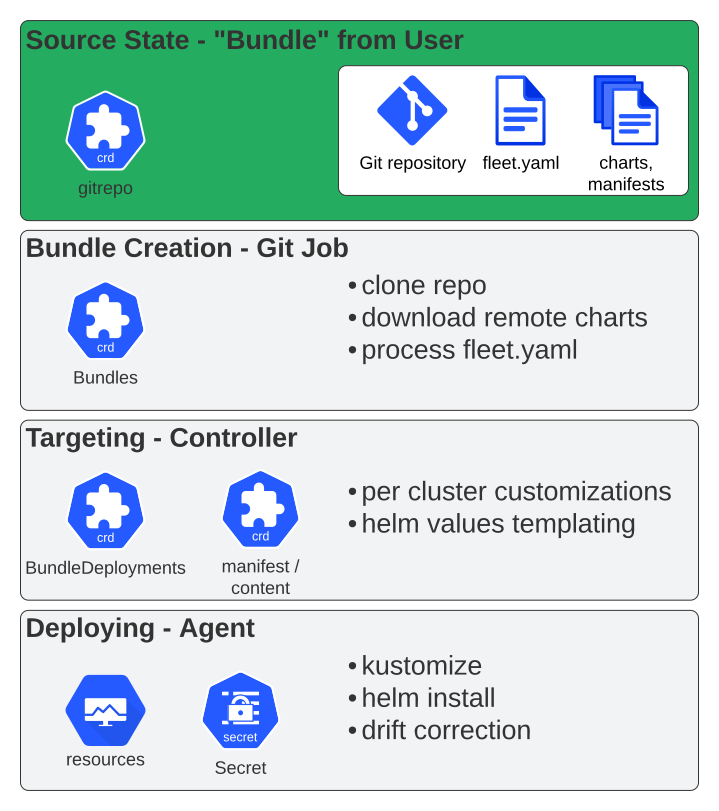
gitjob-controllerwill sync changes from the GitRepo and detect changes from the polling or webhook event. With every commit change, thegitjob-controllerwill create a job that clones the git repository, reads content from the repo such asfleet.yamland other manifests, and creates the Fleet bundle.The job pod with the image name
rancher/tekton-utilswill be under the same namespace as the GitRepo. -
The
fleet-controllerthen syncs changes from the bundle. According to the targets, thefleet-controllerwill createBundleDeploymentresources, which are a combination of a bundle and a target cluster. -
The
fleet-agentwill then pull theBundleDeploymentfrom the Fleet controlplane. The agent deploys bundle manifests as a Helm chart from theBundleDeploymentinto the downstream clusters. -
The
fleet-agentwill continue to monitor the application bundle and report statuses back in the following order: bundledeployment > bundle > GitRepo > cluster.
This diagram shows the different rendering stages a bundle goes through until deployment.
Deployment Errors and Retries
When the fleet-agent fails to deploy a bundle to a downstream cluster, it reports the error in the bundle’s status. Depending on the error, the agent then either retries on its own or waits for the bundle to change.
Errors That Are Retried
Most errors are retried. These are usually temporary problems, for example a CRD that is not installed yet, a Helm repository or OCI registry that cannot be reached, or a resource rejected by an admission webhook. The bundle is shown as ErrApplied until a retry succeeds.
-
Exponential backoff: the first retry happens after a few milliseconds, and the delay doubles after each failure, up to a maximum of 1000 seconds (about 17 minutes). After roughly 20 minutes of continuous failures, the agent retries about every 17 minutes.
-
No retry limit: the agent keeps retrying until the deployment succeeds or the bundle is paused or deleted.
-
Changes are applied immediately: a change to the bundle, such as a new commit, starts a new attempt right away, without waiting for the backoff delay. Restarting the
fleet-agentresets the backoff.
A few situations are retried at a fixed interval instead:
-
A bundle waiting for its dependencies is checked every 15 seconds.
-
If the deployment’s service account is not allowed to create the target namespace, set its labels or annotations, or copy downstream resources into it, the deployment is retried every 2 minutes. It succeeds once the missing permissions are granted.
Errors That Are Not Retried
Some errors cannot be fixed by trying again, because the bundle itself must change. Fleet records these errors in the bundle’s status and does not retry them:
-
The chart requires a Kubernetes version that is not compatible with the cluster (
kubeVersion). -
The manifests are invalid, for example because of YAML parse errors, schema validation errors or unknown fields.
-
The bundle changes a field that cannot be updated, for example an immutable field of a resource.
-
A resource already belongs to a different Helm release.
-
Helm timed out waiting for resources to become ready, when
helm.timeoutSecondsis set. -
An upgrade failed and was rolled back, when
helm.atomicis set.
The bundle is shown as NotReady, with the error in its message. Fleet tries to deploy it again only when the bundle changes. To do so, fix the problem and push a new commit, or select Force Update on the GitRepo. Restarting the fleet-agent does not trigger a new attempt.
Dependencies
A bundle that uses dependsOn is only deployed once all of its dependencies are in an accepted state, which is Ready by default. Dependencies are checked separately on each downstream cluster: a dependency must be deployed to the same cluster as the bundle that depends on it.
-
While a dependency is not in an accepted state, the dependent bundle is shown as
WaitingForDependencyand is checked again every 15 seconds. It waits indefinitely: there is no timeout. -
A dependent bundle which is already deployed is not removed when a dependency leaves its accepted state, but it does not receive updates until the dependency is back in an accepted state.
-
If Fleet finds no deployment of a dependency for the cluster, for example because the dependency does not target that cluster, does not exist yet, or its name or selector is wrong, the dependent bundle is shown as
ErrAppliedwith ano bundles matching labelsmessage. It is then retried with exponential backoff, so it may take up to about 17 minutes to notice the dependency once it appears. -
A dependency that failed with an error that is not retried blocks its dependent bundles until the dependency is fixed.
Examining the Bundle Lifecycle With the CLI
Several fleet CLI commands help with debugging bundles.
fleet apply
Apply renders a folder with Kubernetes resources, such as a Helm chart, manifests, or kustomize folders, into a Fleet bundle resource.
git clone https://github.com/rancher/fleet-test-data
cd fleet-test-data
fleet apply -n fleet-local -o bundle.yaml testbundle simple-chart/
More information on how to create bundles with fleet apply can be found in the section on bundles.
fleet target
Target reads a bundle from a file and works with a live cluster to print out the bundledeployment & content resource, which fleetcontroller would create. It takes a namespace as an argument, so it can look in that namespace for e.g. cluster resources. It can also dump the data structure which is used during "targeting", so decisions taken regarding labels and cluster names can be checked.
fleet deploy
Deploy takes the output of fleet target, or a dumped bundledeployment/content resource and deploys it to a cluster, just like fleet-agent would. It supports a dry run mode, to print out the resources which would be created, instead of installing them with helm. Since the command doesn’t create the input resources, a running fleet-agent would likely garbage collect the deployment.
The deploy command can be used to bring bundles to air-gapped clusters.
Lifecycle CLI
Fleet CLI commands help you debug and understand the bundle lifecycle. The following example uses the full bundle lifecycle using CLI:
git clone https://github.com/rancher/fleet-test-data
cd fleet-test-data
fleet apply -n fleet-local -o bundle.yaml testbundle simple-chart/
fleet target --bundle-file bundle.yaml --dump-input-list  > bd.yaml
fleet deploy --input-file bd.yaml --dry-run
For information about apply, refer to Create a Bundle Resource.